Your agent writes Markdown.
Your readers get a page.
Plans, reports and visuals come out of a short Markdown file as one polished HTML page, with diagrams, charts, drill-downs and diffs. One more command publishes it as a link.
$npm i -g @phnx-labs/artifacts-cli
See how it works

Scaffold. Preview. Share.
Scaffold
Creates the Markdown with title, repository, branch and agent already filled in.
artifacts new plan --out plan.md
Preview
Renders one HTML file and serves it on your machine. It re-renders each time the agent saves.
artifacts render plan.md --open
Share
Publishes a link that unfurls in Slack: public, company-only, only you, or key-protected.
artifacts share plan.md
Real renders, not mockups.
Every tile is a render of a file in the repository's examples/ folder. Each page is a single HTML file that works offline, in light and dark.

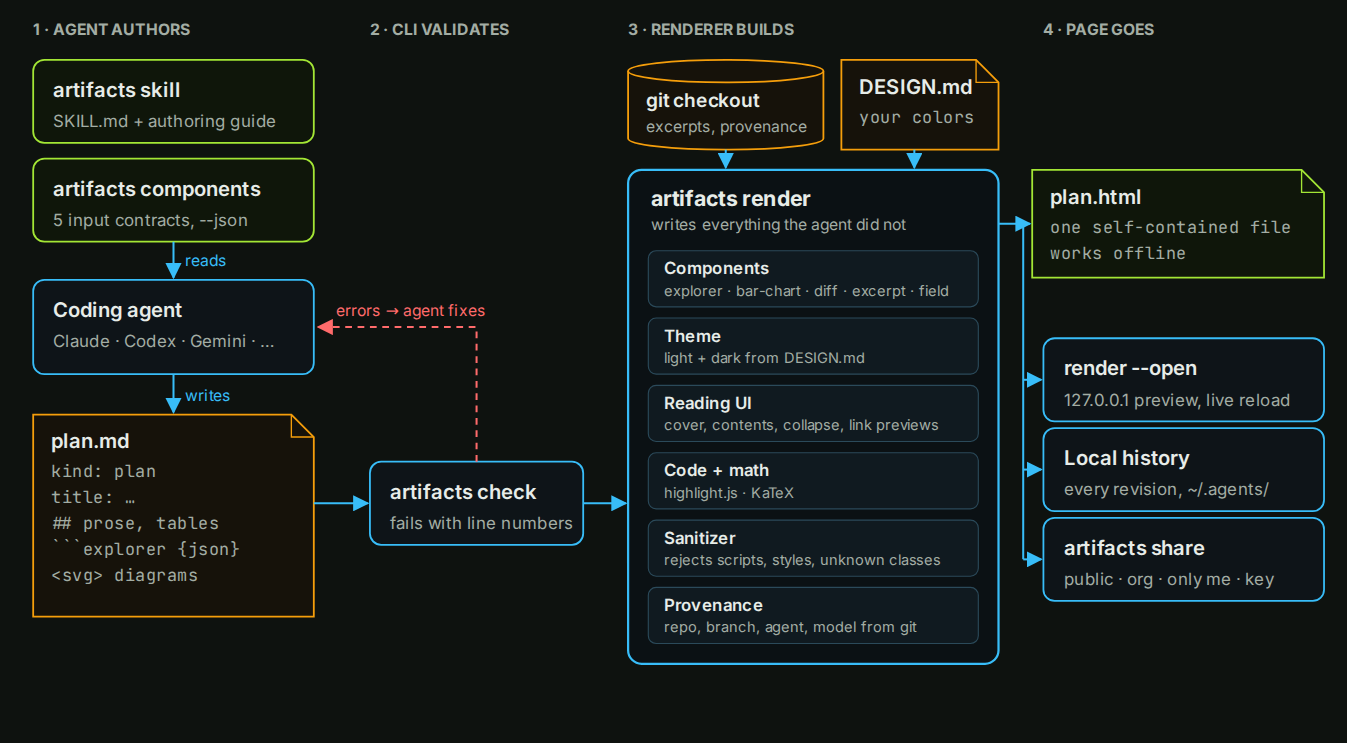
The agent writes the content. The renderer writes the page.
The agent never writes component HTML, CSS or JavaScript. It writes a few lines of data, and the renderer builds the finished, interactive component.
---
kind: visual
title: Where the dead code is
---

## Story

Most removable code sits in two services.

## Figure

```explorer
{ "title": "Removable code",
  "metric": { "label": "Removable", "unit": "%", "max": 100 },
  "items": [
    { "label": "Web", "value": 25 },
    { "label": "API", "value": 10 } ] }
```
It learns the format from the CLI
The artifacts skill teaches the workflow, and artifacts components --json prints each component's input with an example to copy.
Mistakes come back with line numbers
artifacts check rejects unknown fields, missing sections, out-of-range values and unsafe HTML before anyone reads the page.
The renderer adds everything else
Layout, light and dark themes, the cover, contents, collapsible sections, code highlighting, math, link previews and provenance from git.
Your brand, set once
Put your colors and fonts in DESIGN.md. Every artifact from every agent uses them.
A tenth of the tokens. One look. Checked first.
Any agent
Claude, Codex, Gemini and others render through the same design, so a page looks the same whichever agent wrote it.
Components from fences
explorer, bar-chart, diff, excerpt and field take JSON, a table or a single line.
Cites real code
An excerpt reads the lines from your git checkout and links them to the exact commit, so they can't be misquoted.
Built for reading
A contents rail, collapsible sections, link previews, a references list, highlights and notes.
One file, anywhere
The HTML works offline. Keep it in your repository, reopen earlier versions from local history, or share a link.
Safe by default
Embedded HTML and SVG are sanitized, and a page is scanned for emails and credentials before it is published.
Two commands.
Needs Node 20 or later.
npm i -g @phnx-labs/artifacts-cli
agents skills add gh:phnx-labs/artifacts-cli \
  --names artifacts --agents claude,codex -y